Your team is probably already using AI at work, just on personal accounts, with no rules and no visibility. Someone drafts a client email with it. Someone else pastes in a contract for a quick summary. It’s helpful, but nobody knows what data is leaving the building.
Fixing that doesn’t need a big project. If your team is somewhere between 200 and a few thousand people, you can set up proper, governed AI in about a week. Here’s how.
In a larger company, the stakes are higher. More people means more tools, more data and more ways for something to go wrong. But the steps are the same, and you don’t need to wait for next year’s budget cycle to take them. Below is the day-by-day plan we’d follow, plus the mistakes worth avoiding.
Week zero: put a small rollout team together
Before Monday, decide who will actually make the calls this week. Keep the group small, five or six people at most:
- Someone from IT, who owns the platform and SSO
- Someone from security, who signs off on the data rules
- Someone from legal or compliance, especially if you’re in a regulated industry
- Someone from HR, who helps shape the policy and training
- One business leader who uses AI every day and can speak for regular users
Give the group one owner with the final say. Rollouts stall when five people each have a veto and nobody has the last word. Book a short check-in every morning this week, and keep it to decisions only.
Before you start: find out what’s already happening
Send a quick anonymous survey with three questions: which AI tools people use for work, what they use them for, and whether they’ve ever pasted in something they weren’t sure about.
Keep it anonymous and you’ll get honest answers. They’ll show you where your risk is, and who your early fans are. Those fans will be your best helpers later in the week.
If you can, look at expense reports too. In bigger companies, it’s common for different departments to pay for different AI tools without knowing about each other. That’s wasted money as well as risk.
By the end of this step, you should have a rough picture: which tools are in use, which teams rely on AI most, and what kind of data is going in. That picture shapes every decision you make this week.
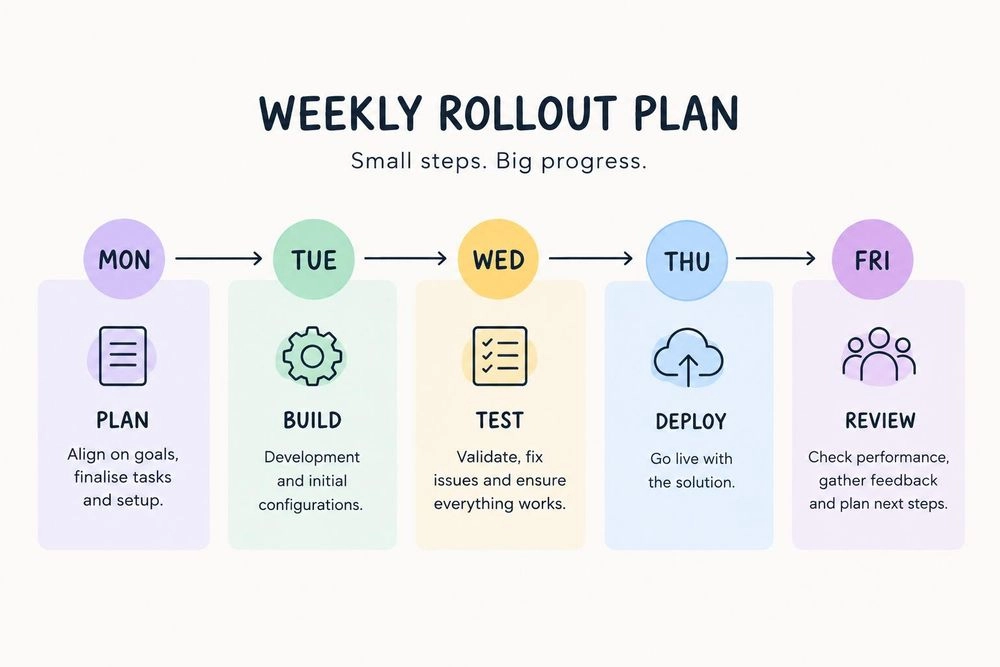
Monday: write rules people will actually read
Keep your policy to one page. If it’s longer, nobody will read it, and a policy nobody reads protects nobody. Cover four things:
- Approved tools. By Friday, this will be one shared workspace.
- What never goes into AI. Customer personal data, passwords and API keys, unreleased financials, and anything under NDA.
- Who owns the output. Whoever sends it. AI can draft, but a person checks the facts before anything reaches a client or goes live.
- Where to ask. One channel or one named person for “is this okay?” questions.
Write it the way you’d explain it to a new hire over coffee. “Don’t paste customer phone numbers into AI” sticks. “Personally identifiable information shall not be transmitted to third-party processors” doesn’t.
In a larger company, get legal and security to review it the same day, not next week. Agree up front that they’re checking for real risks, not rewriting it into legal language. If you’d rather not start from a blank page, our free AI acceptable use policy template gives you a ready-made version to copy and adapt.
Tuesday: pick one platform and connect SSO
Give everyone one place to use AI, so you’re not chasing five tools on five personal accounts. When comparing options, ask:
- Can people use models from more than one provider? Different models are good at different tasks, and being tied to one vendor makes it hard to switch later.
- Does it work with your existing login? It should connect to Google Workspace, Microsoft Entra or Okta without a custom project.
- Can you export audit logs? If something goes wrong, your security team needs records it can actually use.
- Can you cap spending per team? Without caps, one enthusiastic department can use up the whole budget.
- Is your data ever used to train AI models? The answer should be a clear no, in writing.
Look closely at how pricing works, too. Some enterprise AI tools ask you to buy a large minimum number of seats up front, whether people use them or not. Pricing based on active users is much kinder to a gradual rollout.
Connect SSO before you invite anyone. Nobody needs a new password, and when someone leaves, their AI access goes with their account. While you’re there, map your existing groups to roles. Most companies only need three: regular users, team admins who manage budgets, and a small group of platform admins.
![Grengin Access Control screen listing roles such as Super Admin, HR Admin, Finance Admin, IT Admin, Department Admin and User, with user and permission counts for each] (https://cdn.sanity.io/images/2343n0v8/production/29a9df785db8bfd058e561ba91dc8c58861fc629-1501x690.png?w=1000)
Wednesday: set up models, budgets and guardrails
This is the day most teams either overthink or skip. Try to do neither.
- Start small. Offer two or three models, not all of them. One strong all-rounder and one fast, cheaper model cover most daily work. You can add more once you see how people actually use it.
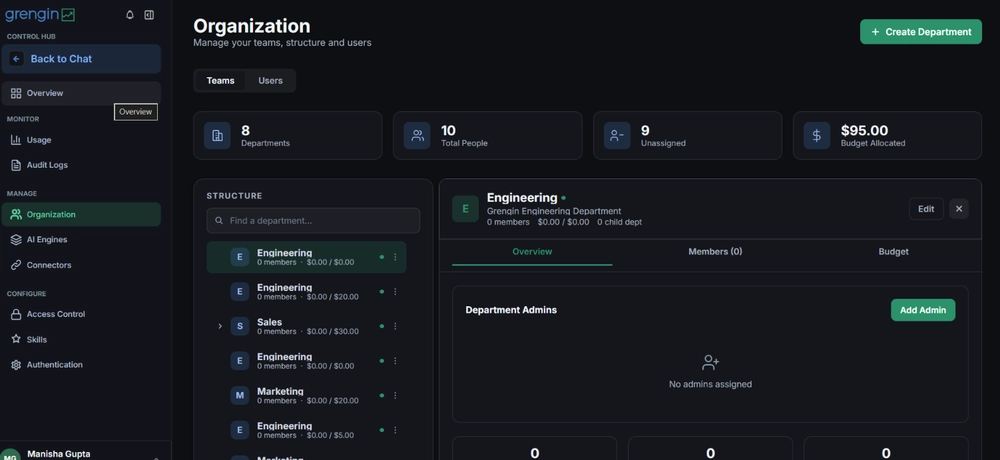
- Set budgets. Give each team a monthly limit with alerts, so nobody gets a surprise bill at the end of the month. Decide up front whether hitting the limit blocks usage or just warns an admin.
- Enforce the rules. Turn your policy into settings. PII detection catches emails, phone numbers and card details before they leave your workspace. Rules people have to remember will slip. Rules the system enforces won’t.
- Be open. Switch on audit logs and tell people exactly what’s logged and who can see it. Trust is what keeps them off personal accounts.
If you’re in a regulated industry, this is also the day to confirm where your data is processed and stored. Running the platform inside your own cloud account keeps everything within your existing security boundary, which usually makes the conversation with compliance much shorter.
Thursday: run a one-day pilot
Pick 20 to 30 people across departments and locations, including a few skeptics. The skeptics are the useful ones. If they can’t find much to complain about, you’re ready.
Give the group a short list of things to try during their normal workday:
- Summarize a long document or report
- Draft an email or a reply to a customer
- Pull insights from a spreadsheet
- Ask a question about something in their own area of work
That way you test the everyday cases, not just whatever people happen to try.
At the end of the day, ask three questions: what worked, what felt clunky, and did anything get blocked that shouldn’t have? Fix the quick issues that afternoon. Maybe a budget is too tight, or a model people wanted isn’t switched on. And save a handful of real prompts that helped, like a sales follow-up email or a support reply to a tricky ticket. They’ll be your training material tomorrow.
Friday: open it up and teach people to use it
Invite everyone and run a 30-minute live session using examples from the pilot. A short session where people can ask questions will do more than a 40-page guide nobody opens. Cover four things: how to log in, which model to use for what, the one-page policy, and where to get help.
Use real examples from each department. When the finance team sees a finance example, it clicks.
In a larger company, one session won’t reach everyone. Record it, and run short follow-up sessions by department over the next two weeks. Ask your pilot users to be the go-to person in their own team. People are far more likely to ask a colleague than to file a ticket.
Set up a channel, something like #ai-tips, for sharing prompts that work. Then give a clear date, say two weeks out, to stop using personal AI accounts for work. Be friendly about it, but be clear. The new workspace only protects you if people actually use it.
After week one: what to keep an eye on
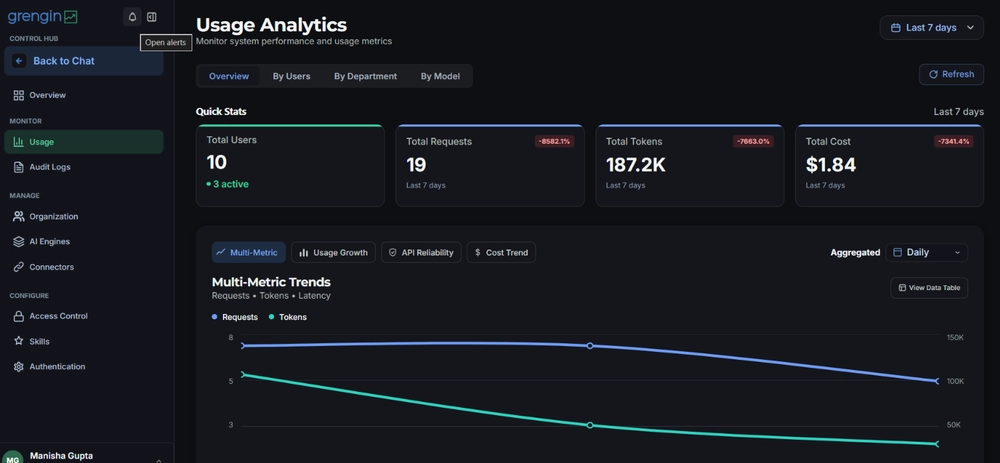
The rollout is done, but the first month tells you whether it stuck. Track three things:
- Adoption: how many people use it each week, and which teams are quiet
- Spend: what each team uses against its budget, and the cost per active user
- Value: what people say they’re saving time on
A quiet team isn’t a failure. Usually they just haven’t seen an example that fits their work, so go and show them one. And if a team is burning through its budget, find out why before you cut them off. They might be your best use case.
Share a few early wins with leadership at the end of the month. Real stories, like a report that took a day now taking an hour, carry more weight than any usage chart. Then review your policy after 30 days, once you know how people really use AI.
Five mistakes we see again and again
- Banning AI outright. It feels safe, but it isn’t. People don’t stop using AI, they just stop telling you about it.
- Waiting for the perfect policy. A good-enough policy this week beats a perfect one next quarter. By then, the risky habits are already set.
- Letting one team choose for everyone. If IT picks a tool without asking marketing or finance, don’t be surprised when those teams keep using something else.
- Paying for unused seats. Watch out for contracts with big minimum seat counts. Paying for 1,000 licenses when 300 people log in makes AI look far more expensive than it is.
- Treating it as an IT project. The setup is technical, but the rollout isn’t. It’s a change in how people work every day, so it needs the same care as any other change.
Quick answers to common questions
Can a company with thousands of people really do this in a week?
Yes, if you focus on getting the foundations right. SSO means you don’t have to create accounts one by one, and a pilot keeps the risk low. Training and adoption will carry on for a few weeks after, and that’s normal.
Do we need to block ChatGPT and other public AI tools?
Not on day one. Give people a better option first, then set a clear date to move. Blocking tools before there’s an approved alternative just pushes usage underground.
What if a department needs a tool we haven’t approved?
Give them a simple way to ask. Your rollout team can review new tools each month. Saying “not yet, let’s check it” works far better than saying no.
One week is realistic
A week sounds quick, but look back at the plan. Most of it is decisions and conversations, not engineering. The technical part should be the easy bit, as long as your platform was built for teams from the start.
That’s why we built Grengin. Deploy it in your own AWS account in about five minutes, or choose Grengin Enterprise for a dedicated deployment with hands-on support. SSO, audit logs, budget caps and PII redaction are built in from day one, and you pay AI providers directly with no markup.
Planning a rollout? You can try it free or see a demo before you commit. Monday’s a good day to start.