
Every enterprise AI vendor now says the same three things: we don’t train on your data, we encrypt everything, and we’re SOC 2 certified. So why do security teams still hesitate?
Because the promise isn’t the same as control. In a security survey published today, 49% of professionals named data leaking through commercial AI tools as one of their main concerns, and many said they have little faith in vendor promises (Help Net Security). Meanwhile, OpenAI alone says it serves more than a million business customers. The question isn’t whether your company will use AI. It’s where your prompts go when it does.
This guide compares five common ways companies give staff AI, from free chatbots to fully self-hosted platforms, on the questions security teams actually ask.
Follow the prompt: where your data actually travels
Every AI conversation has a data path: the route a prompt takes from an employee’s keyboard to the model and back. Who sits on that path, and who stores what along it, is the whole security question.
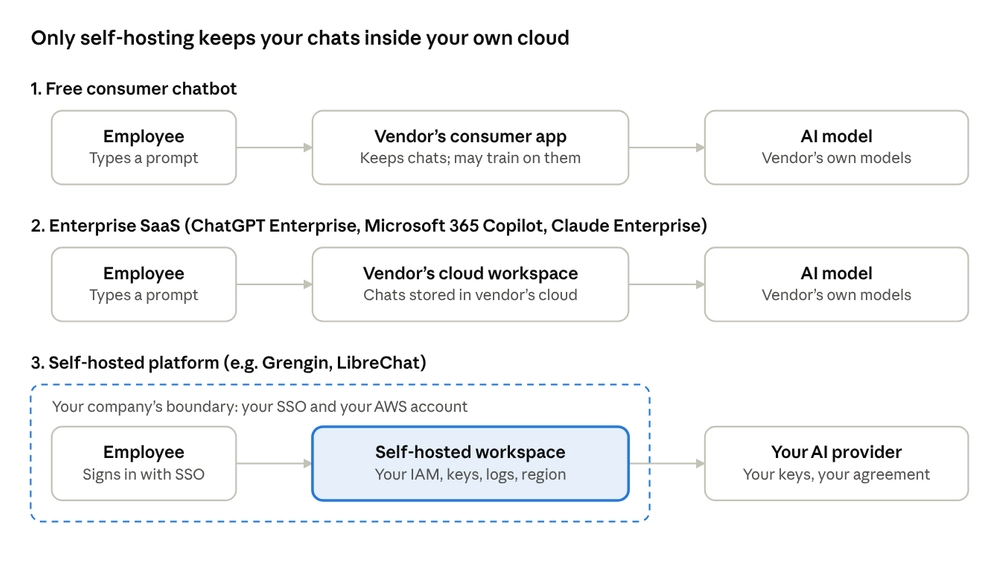
Where a prompt travels in three common AI setups
In the first two setups, your conversation history lives on the vendor’s servers, under the vendor’s controls. In the self-hosted setup, it stays in a database inside your own cloud account. Only the prompt itself travels on to the AI provider, under your own API keys and your own agreement with that provider.
Self-hosted vendors describe this as staying “out of the data path”. Grengin, for example, says that when its software is self-hosted, prompts go straight from the customer’s deployment to the AI provider, so the software maker never sees or stores them. It is a meaningful difference, but it moves responsibility rather than removing it: the company running the deployment now owns its security.
The comparison: 5 options, side by side
On paper the enterprise tools look alike, because they all promise no training, encryption and certifications. The differences show up in who holds the data, who holds the keys and how much you can verify for yourself (IntuitionLabs).
| Option | Chats stored in | Trains on your data? | Region control | Code you can inspect | Model choice | Price |
|---|---|---|---|---|---|---|
| Free consumer chatbot | Vendor’s cloud | Often, unless the user opts out | None | No | One vendor | Free |
| ChatGPT Enterprise | OpenAI’s cloud | No, by default | 10 regions to choose from | No | OpenAI models | Custom pricing |
| Microsoft 365 Copilot | Your Microsoft 365 tenant | No | Follows your Microsoft 365 data boundary | No | Microsoft’s choice | $30 per user per month |
| Claude Enterprise | Anthropic’s cloud | No, by default | US-only option; no EU or UK region yet | No | Anthropic models | $20 per seat per month plus usage |
| Self-hosted open source (e.g. Grengin) | Your own AWS account | No; your own provider agreement applies | Any region you deploy in | Yes, Apache 2.0 | OpenAI, Anthropic, Gemini, Mistral and open models | Free from source; you pay your AI providers directly |
What this means for each option:
- Free consumer chatbots are fine for personal use and a liability for company data. There is no admin control, no audit trail and no contract with your company.
- ChatGPT Enterprise suits companies standardising on OpenAI. It offers data residency in 10 regions and customer-managed encryption keys, but those features are not on the cheaper Business plan.
- Microsoft 365 Copilot fits teams already deep in Microsoft 365, since it reuses Purview sensitivity labels, DLP and audit logging.
- Claude Enterprise is strong for teams that want Anthropic’s models, with customer-managed keys and a US-only processing option, but no first-party EU region as of September 2026.
- Self-hosted open source suits teams that want to own the whole stack: one workspace across several AI providers, with chats, logs and keys inside their own cloud. The trade-off is that patching, uptime, backups and security reviews become your job.

What it really costs: a 500-person example
Price is where the five options split most sharply, because they charge in completely different ways. Here is what a company of 500 employees would pay in licence fees alone, using published list prices:
| Option | How you pay | Yearly licence cost for 500 people |
|---|---|---|
| Free consumer chatbot | Nothing, but no contract or controls | $0, plus all the risk |
| ChatGPT Enterprise | Custom contract | Not published; negotiated per company |
| Microsoft 365 Copilot | $30 per user per month | $180,000, on top of existing Microsoft 365 licences |
| Claude Enterprise | $20 per seat per month plus usage | $120,000 before any usage charges |
| Self-hosted open source | Your cloud hosting plus pay-per-use AI provider fees | Varies with real usage |
Per-seat pricing is simple to budget, but you pay the same for someone who uses AI daily and someone who opened it once. Self-hosted tools flip that model: you pay your AI provider only for what people actually use.
To give a sense of scale, take an employee who sends about 50,000 tokens of prompts and gets back 20,000 tokens of answers a day, which is a fairly active user. At Claude Opus 5.5’s list price of $4 and $20 per million tokens, that is about $0.60 a day, or around $13 a month over 22 working days. Lighter users cost far less; heavy agent workloads can cost far more.
The hidden cost on the self-hosted side is people. Someone has to run the server, apply updates, watch the logs and handle backups. For a company with an existing cloud team that is a small extra job; for a company without one, it can quietly erase the savings.
“We don’t train on your data”: what that promise really covers
The good news first: the big providers have converged. OpenAI, for example, states that by default its models are not trained on data from ChatGPT business plans or the API unless a customer opts in (OpenAI). Anthropic, Google and Microsoft make similar commitments for their business products.
The catch is the word “business”. That promise usually applies only when your company has a contract. An employee on a free personal account is covered by consumer terms instead, which is exactly why shadow AI is so risky.
Self-hosted platforms that call models with your own API keys, such as Grengin or LibreChat, change who the contract is with. Your business data is then governed by your company’s own agreement with OpenAI, Anthropic, Google or Mistral, rather than by the terms of a middleman.
Data residency and GDPR: the fine print that trips buyers up
For European companies, where data sits matters as much as who sees it. GDPR fines can reach €20 million or 4% of global annual turnover, whichever is higher. The SaaS options handle residency very differently:
- ChatGPT Business has no data residency. Only Enterprise, Edu, Healthcare and the API qualify, and regional endpoints carry a 10% price uplift for models released from March 2026 onwards.
- Claude has no first-party EU or UK region as of September 2026.
- Region choice is often fixed at setup. OpenAI’s European residency can only be set for new workspaces and projects, not added to existing ones.
Self-hosting removes much of this guesswork. A self-hosted workspace runs inside your existing security and compliance boundary: your identity and access rules, your encryption keys, your network controls and your chosen cloud region. Conversation history and audit logs stay in the region you deploy in. The one piece that still travels is the prompt sent to the model, so pair self-hosting with your AI provider’s regional endpoints where they are available.
![An aerial view of a data centre campus in misty countryside, enclosed by a translucent protective dome] (https://cdn.sanity.io/images/2343n0v8/production/8eee5e45d9aeb58d23b2c7c8fd354a324a66ed0d-1138x757.png?w=1000)
4 myths about AI data privacy, busted
Myth 1: “Enterprise plans don’t keep our data.” They don’t train on it by default, but they do store your conversation history on their servers, under whatever retention settings your admin chooses. “Not used for training” and “not stored” are different promises.
Myth 2: “Self-hosted means 100% private.” Self-hosting keeps chats, files and logs in your own cloud. But unless you also run the AI model yourself, each prompt still travels to the model provider for processing.
Myth 3: “Open source is less secure because anyone can read the code.” Visibility cuts both ways: it lets attackers look, but it also lets your security team and the wider community find and fix problems. What decides real-world security is how well the software is maintained and configured, open or closed.
Myth 4: “Blocking ChatGPT solves the problem.” Surveys keep finding that around 45% of workers have knowingly used AI tools their employer banned. Blocking without offering a good alternative mostly hides the risk from view.
Trust, but verify: why open source changes the conversation
With a closed AI product, your security review ends at the vendor’s documentation. You read the policy, check the certificates and hope the software does what the paperwork says.
Open source lets you check. Projects such as LibreChat and Grengin publish their full code, so a security team can read exactly what the software does with prompts, keys and logs. Some go further: Grengin’s releases ship with a manifest listing the exact component versions and commit IDs, so you can confirm that what is running matches what was reviewed (GitHub). Closed products can be just as secure, but you have to take their word for it.
One honest caveat: self-hosting the app doesn’t make every conversation fully private. If you call a cloud model, the prompt still goes to that provider. Self-hosting controls everything around the model call; your provider choice and agreement control the call itself.
When SaaS is still the right call
Self-hosting isn’t for everyone, and a good comparison should say so.
- No one to run it. If you have no cloud or IT capacity, a managed product may be safer than a neglected server. Some open-source projects, Grengin among them, also sell a managed version for this reason.
- All-in on one ecosystem. If your company lives inside Microsoft 365, Copilot’s built-in Purview labels and DLP are hard to beat.
- One model is enough. If you will only ever use one provider, that provider’s enterprise plan may be the simplest route.
For everyone else, the bar is lower than it used to be. Several open-source workspaces now offer Docker installs or one-click cloud marketplace images; Grengin, for example, says its AWS Marketplace image launches in about five minutes.
5 questions to ask any AI vendor before you sign
- Where exactly are our conversations and files stored, and in which region?
- Can your staff access our prompts, and under what conditions?
- Is training on our data off by default for the plan we are buying, not just the top tier?
- Can we export a full audit log of every AI interaction?
- Can our security team inspect the code, or only the documentation?

Get the next comparison first
Enterprise AI changes every month: new plans, new regions, new fine print. We read it so you don’t have to, and turn it into clear, side-by-side comparisons your security and IT teams can act on.
Follow us to get the next breakdown the day it goes live.
Your turn: which question from the checklist above has a vendor struggled to answer for you? Share it in the comments; the best ones will shape our next comparison.
If you know someone in the middle of an AI vendor review right now, send them this. It might save them a very awkward conversation with legal