Last updated: October 29, 2026. Microsoft changes Copilot plans and prices often, so we update this guide whenever it does.
Short answer: yes, but which Copilot you get depends on your Microsoft 365 plan.
- Home plans (Personal, Family, Premium): Copilot is included in Word, Excel, PowerPoint, Outlook and OneNote, but only for the subscription owner.
- Business, enterprise and education plans: Copilot Chat is included at no extra cost. The full Microsoft 365 Copilot, which works inside your apps with your work data, is a paid add-on: $21 per user per month for businesses with up to 300 users, or $30 per user per month for larger organizations.
- Plans with full Copilot built in: Microsoft 365 Business Standard with Copilot, Business Premium with Copilot and Microsoft 365 E7.
- No Copilot at all: Microsoft 365 Basic and one-time purchases such as Office 2021 or Office 2024.
So if you’re asking “is Copilot included in my Microsoft 365 subscription?”, the honest answer is: some Copilot almost certainly is, but the full version usually isn’t. The rest of this guide shows exactly what each plan includes, how to check what you have, and what changes on December 1, 2026.
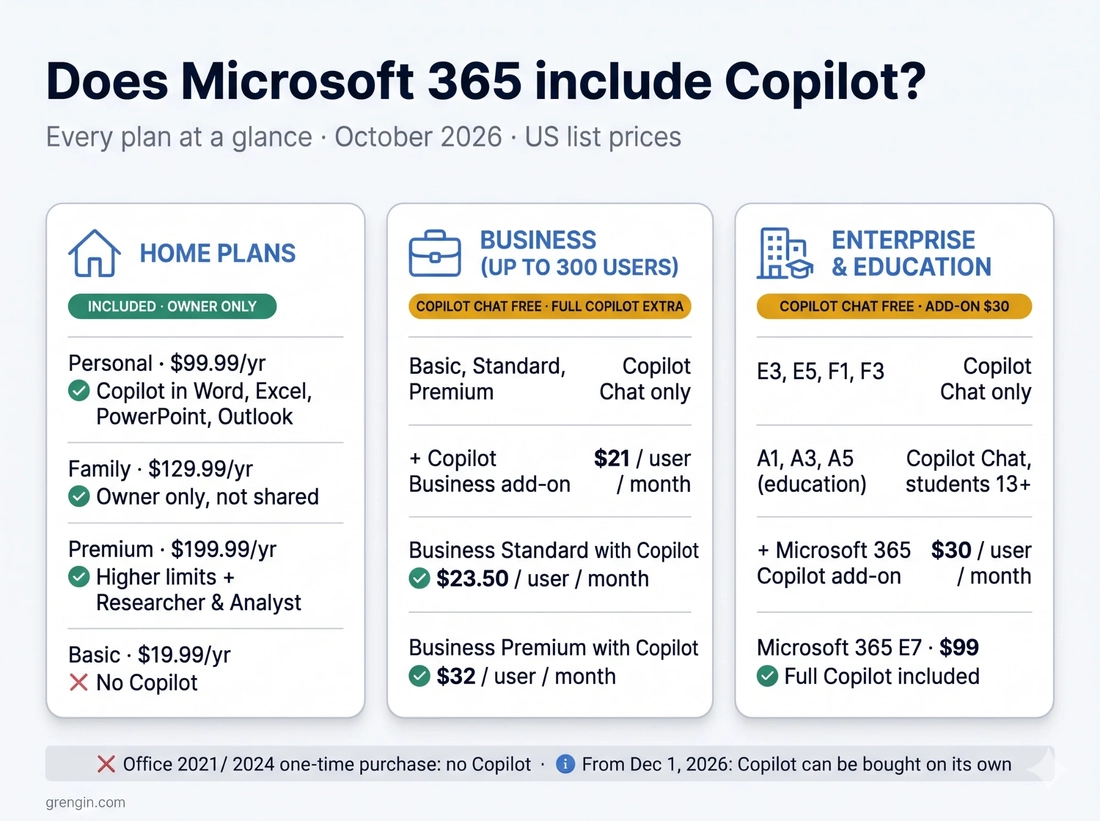
Original infographic created for this guide. Microsoft 365 and Copilot are Microsoft trademarks.
Is Copilot included in Microsoft 365? Every plan at a glance
| Plan (US list price) | Copilot included? | What you actually get | To get full Copilot |
|---|---|---|---|
| Free Microsoft account (no subscription) | Free Copilot app only | Copilot app on the web, Windows and mobile, with usage limits. Not inside desktop Office apps. | Subscribe to Personal, Family or Premium |
| Microsoft 365 Basic ($19.99/year) | No | Microsoft states AI features aren’t available in Basic | Upgrade to Personal or higher |
| Microsoft 365 Personal ($99.99/year) | Yes | Copilot in Word, Excel, PowerPoint, Outlook and OneNote, with monthly AI credits | Already included |
| Microsoft 365 Family ($129.99/year) | Yes, owner only | Same Copilot as Personal for the subscription owner. The other five members don’t get it. | Each member needs their own plan |
| Microsoft 365 Premium ($199.99/year) | Yes, owner only | Higher usage limits plus the Researcher and Analyst agents | Already included |
| Microsoft 365 Business Basic ($7/user/month) | Copilot Chat | Secure web-grounded AI chat in the Copilot app and Outlook | Add Copilot Business ($21) |
| Microsoft 365 Business Standard ($14) or Business Premium ($22) | Copilot Chat | Copilot Chat; Copilot inside Word, Excel and PowerPoint is limited or missing without a license | Add Copilot Business ($21) or switch to a “with Copilot” plan |
| Business Standard with Copilot ($23.50) or Business Premium with Copilot ($32) | Yes, full Copilot | Copilot in Office apps and Teams, grounded in your work data | Already included |
| Microsoft 365 Apps for business or Apps for enterprise | Not on Microsoft’s Copilot Chat list | Desktop Office apps; qualifies for the paid Copilot license | Add Copilot |
| Office 365 E1, E3, E5 and Microsoft 365 E3 ($39) or E5 ($60) | Copilot Chat | Copilot Chat; full Copilot isn’t part of E3 or E5 | Add Microsoft 365 Copilot ($30) |
| Microsoft 365 E7 ($99/user/month) | Yes, full Copilot | E5 plus Microsoft 365 Copilot, Agent 365 and the Entra Suite | Already included |
| Microsoft 365 F1 or F3 (frontline) | Copilot Chat | Copilot Chat for frontline workers | Add Microsoft 365 Copilot |
| Microsoft 365 A1, A3 or A5 (education) | Copilot Chat | Copilot Chat for staff and for students aged 13 and older | Add the academic Copilot license |
| Exchange Online Plan 1 or Plan 2 | No | Email only; it qualifies as a base plan for the paid add-on | Add Microsoft 365 Copilot |
| Office 2021, Office 2024 or Office Professional Plus (one-time purchase) | No | Perpetual Office versions aren’t eligible for Copilot | Move to a Microsoft 365 subscription |
Prices are Microsoft’s US list prices with annual billing, checked on October 29, 2026. Prices, promotions and features vary by country, so confirm on Microsoft’s Copilot pricing page before you buy.
In this guide:
- Copilot Chat vs. Microsoft 365 Copilot
- Home plans: Personal, Family, Premium and Basic
- Business plans
- Enterprise, frontline and education plans
- Office 365, Office 2024 and one-time purchases
- How to check if your Microsoft 365 includes Copilot
- What changed in 2026, and what changes on December 1
- What Copilot really costs: a 25-person example
- FAQ
Copilot Chat vs. Microsoft 365 Copilot: which one do you have?
Microsoft uses the name “Copilot” for several different products, which is why “does Microsoft 365 include Copilot?” has no single answer. For work and school accounts there are two tiers.
Copilot Chat is included at no extra cost with eligible business, enterprise, frontline and education plans when you sign in with your work or school (Microsoft Entra) account. It’s a secure AI chat that mainly uses the web. It only sees your work content when you upload a file, have an email or meeting open in Outlook or Teams, or use a pay-as-you-go agent. You’ll find it in the Microsoft 365 Copilot app, on the web and in Outlook.
Microsoft 365 Copilot is the paid, per-user license. It puts Copilot inside Word, Excel, PowerPoint, OneNote and Teams with priority access, and it automatically draws on the emails, files, meetings and chats you already have permission to see.
Since April 2026, Microsoft shows a label under your name that tells you which tier you’re on:
| Label you see | What it means |
|---|---|
| Copilot Chat (Basic) | No Copilot license. Chat in the Copilot app and Outlook, but no Copilot inside Word, Excel, PowerPoint or OneNote. |
| M365 Copilot (Basic) | No Copilot license, but “standard access” to Copilot in Word, Excel, PowerPoint and OneNote, which depends on available capacity. |
| M365 Copilot (Premium) | You have the paid Copilot license, with priority access to the full experience in your apps. |
Why two kinds of “Basic”? On April 15, 2026, Microsoft removed Copilot from inside Word, Excel, PowerPoint and OneNote for unlicensed users in larger organizations. Reports based on Microsoft’s admin notices put the cut-off at more than 2,000 seats; smaller organizations kept the capacity-limited standard access.
One more naming wrinkle: Microsoft’s technical documentation now calls these products Microsoft Copilot and Microsoft Copilot Chat, while its pricing pages still say Microsoft 365 Copilot. They are the same products.
Home plans: Personal, Family, Premium and Basic
For individuals the answer is simpler. Since January 2025, Microsoft 365 Personal and Family have included Copilot in most markets, which is also when their prices went up.
- Microsoft 365 Personal ($99.99 a year or $9.99 a month) includes Copilot in Word, Excel, PowerPoint, Outlook and OneNote, plus AI image creation. Usage runs on a monthly allowance of AI credits and feature limits that reset at the start of each month; Microsoft has listed 60 credits a month for Copilot in the apps.
- Microsoft 365 Family ($129.99 a year) covers up to six people, but Copilot is for the subscription owner only. Microsoft’s support page says AI benefits “cannot be shared with others”, so the other members need their own Personal or Premium plan to get Copilot in the apps. Microsoft has emailed some Family and Premium subscribers about giving everyone on the plan access through one shared household allowance, but it hasn’t announced a date, and its support pages still describe the owner-only rule.
- Microsoft 365 Premium ($199.99 a year or $19.99 a month) replaced Copilot Pro in October 2025. It includes everything in Family, much higher Copilot limits, and the Researcher and Analyst agents that Personal and Family don’t get. The AI features are still for the account holder only.
- Microsoft 365 Pro ($99.99 a month) is a newer tier for very heavy users, with the highest limits and more storage.
- Microsoft 365 Basic ($19.99 a year) does not include Copilot. Microsoft’s plan page states that AI features aren’t available in Basic.
You don’t need a subscription to use AI at all: anyone with a free Microsoft account can use the Copilot app on the web, in Windows and on mobile, within free usage limits. What you can’t get for free is Copilot inside the desktop Word, Excel, PowerPoint and Outlook apps.
Business plans: what’s included and what costs extra
This is where most of the confusion, and most of the cost, sits. A business can pay for Word, Excel, Outlook, Teams and OneDrive and still not have the full Copilot.
Included with Business Basic, Standard and Premium: Copilot Chat, plus Copilot in Outlook. Business Basic only includes the web and mobile Office apps.
Option 1: add Copilot Business to your existing plan. Microsoft 365 Copilot Business costs $21 per user per month on an annual plan, or $25.20 with monthly billing. Existing business customers can get a first-year promotional price of $18 on an annual commitment for purchases made between July 1 and December 31, 2026. It’s sold for organizations with up to 300 users, and you can buy it for only the people who need it.
Option 2: buy a plan with Copilot built in. Microsoft made two bundles permanent on July 1, 2026, for organizations with up to 300 users:
- Microsoft 365 Business Standard with Copilot: $23.50 per user per month, paid yearly
- Microsoft 365 Business Premium with Copilot: $32 per user per month, paid yearly
At current US list prices, the bundle costs less than buying the base plan and the add-on separately: Business Standard ($14) plus Copilot Business ($21) comes to $35 per user, against $23.50 for the bundle. If you’re about to add Copilot for a whole team, price the bundle first.
Watch for usage-based charges. Microsoft now describes its model as “everyday AI is included in your license” while more advanced work is billed as you use it. Copilot Cowork, Autopilot, some advanced AI in SharePoint and agents that work over company data draw on Copilot Credits. From December 1, 2026, new Copilot Business licenses bought through a Microsoft partner (CSP) have pay-as-you-go billing switched on by default, with a default limit of 4,000 Copilot Credits per user per month. Admins can change that limit, and it’s worth setting one deliberately.
A small but common catch: Copilot in Teams needs a Teams license, so “no Teams” versions of Microsoft 365 plans won’t give you Copilot in Teams meetings.
Enterprise, frontline and education plans
- Office 365 E1, E3 and E5, and Microsoft 365 E3 and E5: Copilot Chat is included; full Copilot isn’t. The Microsoft 365 Copilot add-on costs $30 per user per month paid yearly, or $31.50 paid monthly on an annual commitment. Microsoft’s own E3, E5 and E7 comparison lists Copilot as “available as an add-on” for E3 and E5.
- Microsoft 365 E7 ($99 per user per month): launched in May 2026 as the “Frontier Suite”. It bundles Microsoft 365 E5, Microsoft 365 Copilot, Microsoft Agent 365 and the Microsoft Entra Suite. It’s currently the only enterprise suite with full Copilot included.
- Microsoft 365 F1 and F3 (frontline): Copilot Chat is included, and both plans qualify for the paid add-on.
- Microsoft 365 A1, A3 and A5 and Office 365 A plans (education): Copilot Chat is available to faculty, staff and students aged 13 and older. Schools can buy the academic Copilot license through Microsoft’s education channels. If you use Microsoft 365 through your university, whether you have full Copilot (in Excel, for example) depends on what your school licensed; the label check below will tell you.
- Standalone services such as Exchange Online Plan 1 and Plan 2, SharePoint, OneDrive, Teams Essentials, Planner, Project and Visio: none of them includes Copilot, but they’re on Microsoft’s list of plans that qualify for the paid Copilot license.
Office 365, Office 2024 and one-time purchases
“Office 365” is the older name for what is now mostly Microsoft 365. The consumer Office 365 plans were renamed Microsoft 365 in 2020, and business suites such as Office 365 E3 still carry the old name. So “does Office 365 include Copilot?” has the same answer as above: Copilot Chat on business plans, full Copilot only with a paid license or a plan that includes it.
One-time purchases are different. Office Home 2024, Office 2021 and Office Professional Plus don’t include Copilot. Microsoft supports Copilot only on the cloud-backed apps in Microsoft 365 subscriptions, and on-premises versions of Office aren’t eligible. There’s also no “lifetime” Microsoft 365: if you paid once, you have perpetual Office, and you’d need a subscription to use Copilot in the apps.
If you bought Microsoft 365 through a reseller or web hosting company, the same rules apply to the Microsoft plan underneath. Ask your provider which plan you’re on and whether they sell the Copilot license.
How to check if your Microsoft 365 includes Copilot
With a work or school account:
- Sign in at m365.cloud.microsoft with your work or school account.
- Scroll to the bottom of the home page and look at the label under your name: Copilot Chat (Basic), M365 Copilot (Basic) or M365 Copilot (Premium). The table above explains each one.
- If you need the full version, ask your IT admin. Copilot is licensed per user, so an admin buying Copilot doesn’t switch it on for the whole team; a license has to be assigned to each person.
With a personal Microsoft account:
- Go to account.microsoft.com and open Services & subscriptions to see your plan and your remaining AI credits.
- On Windows 11, you can also select Start, then your account, to see which Microsoft 365 subscription you’re signed in with.
- In the Copilot app, the badge next to your name shows which account you’re using: Personal for a Microsoft account, or Work for a work or school account. The Copilot that comes with Personal, Family or Premium only appears when you’re signed in with the account that holds the subscription.
- If you’re a member of someone else’s Family plan, you won’t have Copilot in the apps; only the owner does.
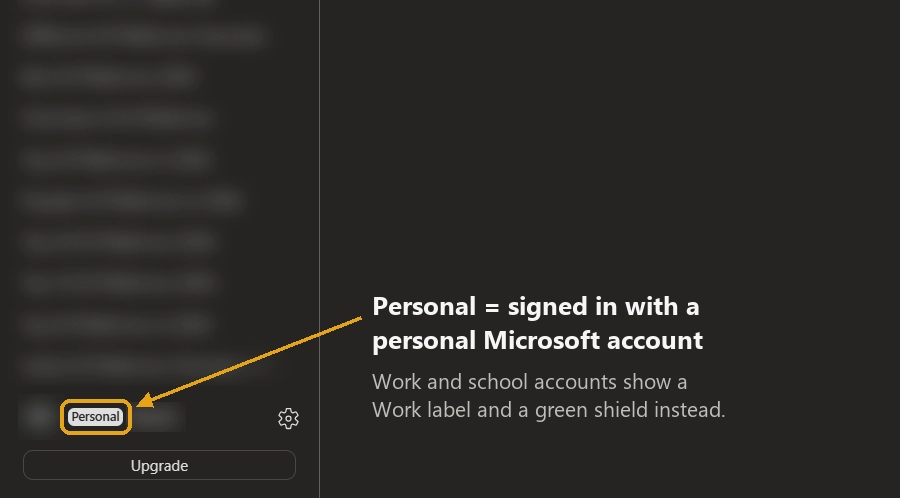
The account badge in the Copilot app. Personal details are blurred.
If Copilot is missing or asks you to upgrade:
- An “Upgrade” button in Outlook or Word usually means the account you’re signed in with has Copilot Chat only, or isn’t the account that holds your subscription.
- If you know you have a license, sign out of every account in the Office app, sign back in with the licensed account only, then go to File > Account > Update License.
- If the free Copilot app says you need Microsoft 365 for more usage even though you have it, check you’re signed in with the Microsoft account that owns the subscription, not a family member’s or a work account.
What changed in 2026, and what changes on December 1
Copilot licensing changed more in 2026 than in any year since launch. The changes that matter to buyers:
- April 15, 2026: unlicensed users in larger organizations lost Copilot inside Word, Excel, PowerPoint and OneNote, and Microsoft introduced the Basic and Premium labels.
- May 2026: Microsoft 365 E7 went on sale with Copilot included.
- July 1, 2026: Microsoft raised commercial prices. Business Basic went from $6 to $7, Business Standard from $12.50 to $14, Microsoft 365 E3 from $36 to $39 and E5 from $57 to $60. Copilot add-on prices didn’t change, and the Business Standard and Business Premium “with Copilot” bundles became permanent.
- October 16, 2026: Copilot licenses that need a Microsoft 365 base plan were renamed with “(add-on)”, for example “Microsoft 365 Copilot (add-on)” and “Microsoft 365 Copilot Business (add-on)”. If you see that on an invoice, nothing about your product or price has changed.
- December 1, 2026: Microsoft 365 Copilot and Copilot Business can be bought without a qualifying Microsoft 365 base subscription, at the same prices, across all sales channels. The add-on versions stop being sold through partners, though existing customers can keep renewing them. One caveat from Microsoft’s partner announcement: Copilot experiences still depend on the Microsoft 365 apps and services you’re licensed for. Buying Copilot on its own doesn’t give you Word, Excel or Outlook.
- December 1, 2026: pay-as-you-go billing becomes the default for new Copilot Business licenses bought through partners.
What does the full Microsoft 365 Copilot license add?
Compared with free Copilot Chat, the paid license adds:
- Copilot inside your apps: Word, Excel, PowerPoint, Outlook, OneNote and Teams (with a Teams license), with priority access.
- Work-grounded answers: Copilot draws on Microsoft Graph and Work IQ, Microsoft’s layer for understanding your emails, files, meetings, chats and how you work. It only uses content you already have permission to see.
- Agents and model choice: the Researcher and Analyst agents, plus a choice of AI models in some experiences.
- Admin tools: analytics on adoption and impact, enterprise data protection, and SharePoint Advanced Management for tackling oversharing.
It does not include:
- The Microsoft 365 apps themselves. You still need licenses for Word, Excel, Outlook and Teams.
- Usage-based experiences such as Copilot Cowork, Autopilot, Work IQ APIs and metered agents, which are billed in Copilot Credits.
- Other products with “Copilot” in the name. GitHub Copilot is a separate subscription from GitHub. Full Copilot Studio, Power BI, Dynamics 365 Business Central and Azure each have their own Copilot features under their own licensing.
- ChatGPT. Copilot uses OpenAI models among others, but a Microsoft 365 plan doesn’t include a ChatGPT subscription.
What Copilot really costs: a 25-person example
Here’s what a 25-person company already on Microsoft 365 Business Standard would pay a year, using US list prices with annual billing:
| Setup | Per user per month | Yearly cost for 25 people |
|---|---|---|
| Business Standard with Copilot Chat only | $14 | $4,200 |
| Business Standard + Copilot Business for everyone | $35 ($32 with the first-year promotion) | $10,500 ($9,600) |
| Business Standard with Copilot (bundle) | $23.50 | $7,050 |
| Business Standard for everyone + Copilot Business for 5 heavy users | Mixed | $5,460 |
| Business Standard + Grengin Team plan for everyone | $14 + a flat $500 a year for up to 30 people | $4,700, plus AI usage at your provider’s prices |
Two things stand out. First, the bundle beats the add-on for a whole team at list price. Second, most teams don’t need full Copilot for everyone: licensing only the people who live in Excel, Outlook and PowerPoint all day is often the best value. Usage-based extras such as Cowork come on top of every Copilot row.
The Grengin row isn’t a like-for-like replacement. It gives everyone a governed AI workspace with several model providers, but it doesn’t put AI inside Word or Excel. It’s there because many teams need everyday AI chat for everyone, plus in-app Copilot for a few.
When your team uses more than Microsoft
Microsoft 365 Copilot is strongest when your organization lives inside Microsoft’s ecosystem: Outlook, Teams, Word, Excel, PowerPoint and SharePoint.
But many teams aren’t Microsoft-only. They use Google Workspace, Slack, Notion, Jira or Confluence, and they want to use models from more than one AI provider. Then the question isn’t only “which Copilot plan should we buy?” It’s “where should our organization’s AI live?”
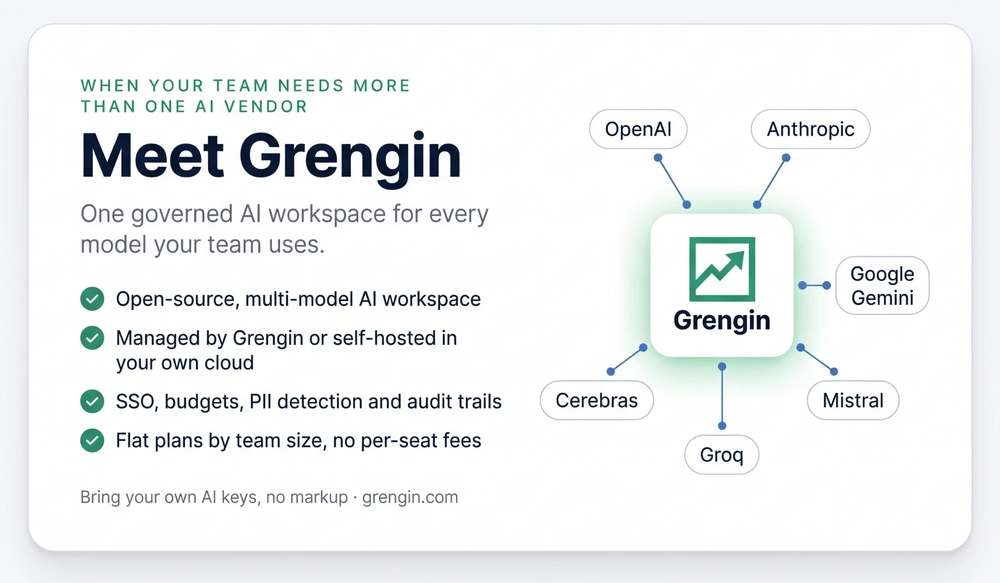
Grengin is an open-source, multi-model AI workspace for teams that want governance without being locked into a single AI model or productivity suite. It supports OpenAI, Anthropic, Google Gemini, Mistral, Groq and Cerebras, with SSO through any SAML 2.0 or OIDC identity provider (including Microsoft Entra ID), budgets, PII detection and audit trails. You bring your own AI keys with no markup, pay a flat plan by team size instead of a per-seat fee, or self-host it for free.
| Dimension | Microsoft 365 Copilot | Grengin | What it means |
|---|---|---|---|
| Core idea | AI built into Microsoft 365 | Governed multi-model AI workspace | Different starting points |
| Model choice | Microsoft’s selection of models | OpenAI, Anthropic, Gemini, Mistral, Groq, Cerebras | Grengin is more model-flexible |
| Office integration | Deep, inside Word, Excel, Outlook and Teams | Not the main purpose | Copilot wins for Microsoft-native work |
| Work data grounding | Microsoft Graph and Work IQ | Files and context your users provide | Copilot knows your Microsoft 365 content |
| Governance | Microsoft Purview and admin center | SSO, budgets, PII detection, audit trails | Both target control, in different ways |
| Deployment | Microsoft cloud | Managed by Grengin, or self-hosted in your own cloud | Grengin offers infrastructure choice |
| Pricing | $21 to $30 per user per month, plus usage-based extras | Flat plan by team size, plus AI usage at provider cost | Matters most for large or mixed teams |
See the full Microsoft 365 Copilot vs. Grengin comparison or Grengin’s plans and pricing.
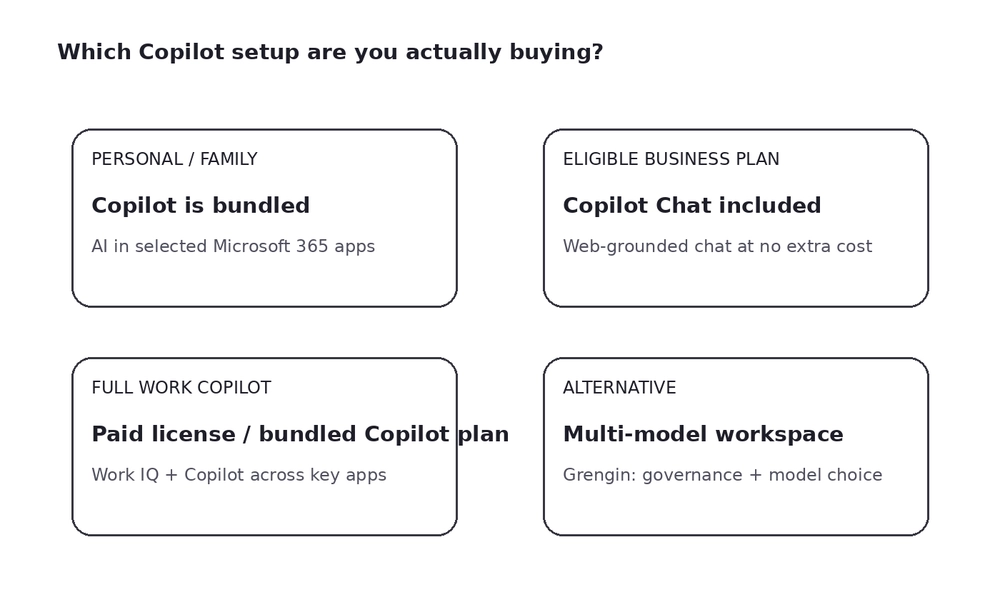
A simple decision map for choosing the right AI setup.
Choose Microsoft 365 Copilot if…
- Your people spend most of their day in Word, Excel, PowerPoint, Outlook and Teams.
- You want AI that already knows your Microsoft 365 emails, files and meetings.
- You prefer one vendor for productivity apps, identity and AI administration.
Consider Grengin if…
- Your team wants models from several AI providers in one governed workspace.
- You work across Microsoft, Google and other SaaS tools rather than entirely in Microsoft 365.
- You want predictable flat pricing, or to self-host AI in your own cloud.
Use both if…
- Copilot is worth it for a few Office-heavy roles, but everyone else needs everyday AI chat at a lower cost.
- Different departments have different AI needs, and a single platform would create lock-in.
Five questions to ask before you buy Copilot
- Which Copilot do our users have today: Copilot Chat (Basic), M365 Copilot (Basic) or Premium?
- Who actually needs Copilot inside Word, Excel and PowerPoint, and who would be fine with Copilot Chat?
- Is a “with Copilot” bundle cheaper than adding Copilot Business to our current plan?
- What spending limit will we set for usage-based features such as Cowork and agents?
- Do we need AI across Microsoft 365 only, or across our whole technology stack and several AI providers?
For a longer checklist, see 10 questions to ask before buying any enterprise AI tool.
FAQ: Microsoft 365 and Copilot
Is Copilot free with Microsoft 365, or does it cost extra?
Some Copilot is included in most plans. Personal, Family and Premium include Copilot in the apps at no extra charge, and business, enterprise and education plans include Copilot Chat. The full Microsoft 365 Copilot for work costs extra: $21 per user per month for businesses with up to 300 users, or $30 for enterprises, unless your plan already includes it.
True or false: Copilot is included with all Microsoft 365 licenses?
False. Microsoft 365 Basic doesn’t include Copilot, business and enterprise plans only include Copilot Chat, and the full Microsoft 365 Copilot is included only in Business Standard with Copilot, Business Premium with Copilot and Microsoft 365 E7.
Does Microsoft 365 Family include Copilot for every member?
Not yet. Copilot in the apps is only for the subscription owner, and the other members need their own Personal or Premium plan. Microsoft has told some subscribers it plans a shared household allowance for Family and Premium, but hasn’t given a date.
Does Microsoft 365 Personal include the full version of Copilot?
It includes Copilot in Word, Excel, PowerPoint, Outlook and OneNote, within monthly AI credits and feature limits. It doesn’t include the Researcher and Analyst agents or the higher limits of Microsoft 365 Premium, and it isn’t the same as the work version, which uses your company’s emails, files and meetings.
Does Microsoft 365 Basic include Copilot?
No. Microsoft states that AI features aren’t available in Microsoft 365 Basic. You can still use the free Copilot app with your Microsoft account, within free limits.
Does Microsoft 365 Business Standard or Business Premium include Copilot?
They include Copilot Chat, but not the full Microsoft 365 Copilot. You can add Copilot Business for $21 per user per month or switch to Business Standard with Copilot ($23.50) or Business Premium with Copilot ($32).
Does Microsoft 365 E3 or E5 include Copilot?
E3 and E5 include Copilot Chat. Full Microsoft 365 Copilot is a $30 per user per month add-on, or included if you move to Microsoft 365 E7.
Does Microsoft 365 A1 or A3 include Copilot?
Education plans include Copilot Chat for staff and for students aged 13 and older. Full Copilot needs the academic Copilot license, which your school has to buy and assign.
Does Exchange Online Plan 2 include Copilot?
No. Exchange Online Plan 2 is an email service only, but it qualifies as a base plan for the paid Microsoft 365 Copilot license. From December 1, 2026, Copilot can be bought without a base plan at all.
Can I get Copilot without a Microsoft 365 subscription?
For personal use, yes: the free Copilot app works with any Microsoft account. For business, from December 1, 2026, Microsoft 365 Copilot and Copilot Business can be bought without a qualifying base plan. But Copilot only works inside the Microsoft 365 apps you’re licensed for, so buying it alone doesn’t give you Word, Excel or Outlook.
If my admin buys Copilot, does my whole team get it?
No. Copilot is licensed per user, so each person needs a license assigned in the Microsoft 365 admin center. Everyone else keeps Copilot Chat.
What’s the difference between Copilot Business and Microsoft 365 Copilot?
They offer the same Copilot capabilities. Copilot Business is the version for organizations with up to 300 users at $21 per user per month; Microsoft 365 Copilot is the enterprise version at $30 with no user cap.
Is Work IQ included in the Copilot add-on?
Yes. Work IQ, the layer that grounds Copilot in your work context, is part of the paid Copilot license. Programmatic access through the Work IQ APIs is billed by usage.
Does Microsoft 365 include GitHub Copilot or Copilot Studio?
No. GitHub Copilot is a separate subscription from GitHub. A Microsoft 365 Copilot license lets you use and build some agents, but full Copilot Studio, for example publishing agents outside your organization, is licensed separately.
Does a Copilot+ PC include Microsoft 365 Copilot?
No. A Copilot+ PC has a Copilot key and Windows AI features, but Copilot in Word, Excel and Outlook still needs a Microsoft 365 Personal, Family or Premium plan, or a work license.
I see Copilot in Excel. Does that mean I’m paying for it?
Not necessarily. On a personal plan it’s part of your Personal, Family or Premium subscription. On a work account, check the label at m365.cloud.microsoft: M365 Copilot (Premium) means your organization pays for a license for you; M365 Copilot (Basic) is the free, capacity-limited version.
The bottom line
Microsoft 365 includes some form of Copilot on nearly every plan, but “included” rarely means the full product. Home users on Personal, Family or Premium already have Copilot in their apps. Businesses get Copilot Chat for free and pay $21 to $30 per user for the full, work-grounded Copilot, unless they buy a plan with it built in.
The smart buying decision isn’t finding the cheapest Copilot button. It’s matching the AI to how your company works: full Copilot for the people who live in Office, Copilot Chat for everyone else, and, if your team works across tools and AI providers, a governed multi-model workspace like Grengin alongside it